


Have you ever calculated how much you've spent in the past three months on ChatGPT Plus, Claude Pro, Cursor, and various APIs?
$20 + $20 + $20 + $120 = $180/month?
And that's just the start.
When team collaboration, batch document processing, and automated scripts go live, the bill can easily exceed $300.
But the truth is:
You might need cutting-edge cloud models for less than 20% of your daily use.
The other 80%—writing emails, reading contracts, summarizing meeting notes, completing code, analyzing your own data, auto-replying to customers—can all be done locally, without uploading a single word, without relying on the internet, and without paying per token.
Key point:
But the truth is: you might need cutting-edge cloud models for less than 20% of your daily use.
And what powers all this is not an expensive data center, but a small device quietly placed under your desk or on a shelf.
Its hardware is a one-time investment, and subsequent monthly electricity costs are only $2–15 (typical value around $3).
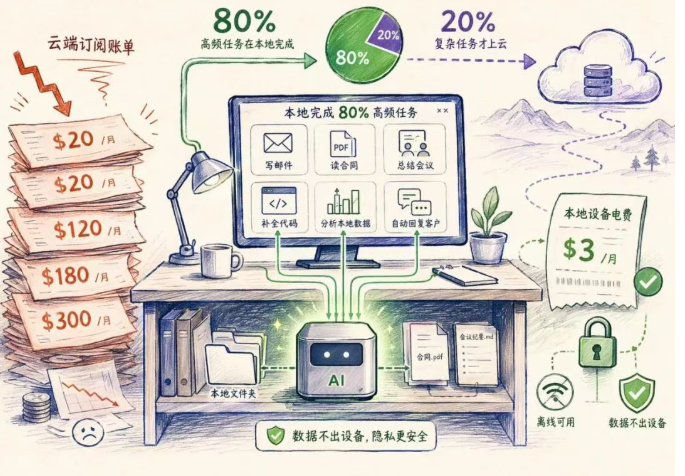
This is not a future concept, but a realistic solution already implemented in 2026.
Below, we will thoroughly outline the feasible path for local AI, from cost structure, technological evolution, device selection to practical deployment.
Why Now is the Best Time to Deploy Local AI?
Two years ago, running a "usable" AI model locally meant accepting slow responses, limited context, complex environment configuration, and hard requirements for underlying knowledge like CUDA, quantization, and memory mapping.
Consumer-grade hardware at that time indeed struggled to handle serious workflows.
But 2026 is completely different:
More mature GGUF quantization technology allows 7B models to run smoothly on devices with 8GB memory;
Apple's unified memory architecture and NVIDIA Jetson's dedicated AI acceleration units significantly reduce inference latency;
Toolchains like Ollama, LM Studio, Open WebUI have matured, requiring only 4 commands to deploy;
Mainstream open-source models (Llama 3.2, Mistral, Gemma 2, Qwen 2.5) have stably covered 80% of daily needs in tasks like writing, coding, RAG, and automation.
What about the remaining 20%?
For example, multi-hop complex reasoning, generating deployable frontend code, or training domain-specific models—these scenarios still require cloud services.
But the key is:
You don't have to pay for 100% of your usage just for that 20% need.
Comparison of Three Mainstream Local AI Devices: Choose According to Needs, Reject Premiums
The following three devices cover the full spectrum from personal light use to enterprise-level production deployment.
Their common features are:
All inference is done locally, data never leaves the device, API interface is compatible with OpenAI standard, and existing code can be migrated with almost zero modification.
▸ NVIDIA Jetson Orin Nano Super — $249|Lightweight主力, Fast ROI
This is currently the most cost-effective professional entry-level choice.
Released by Jensen Huang at the end of 2024, it compresses an Ampere architecture GPU for edge AI into a body smaller than a wallet.
Jetson Orin Nano Super Specifications:
AI Performance: 67 TOPS
GPU: 1024-core NVIDIA Ampere
RAM: 8GB LPDDR5
Power: 7–25W
Size: Smaller than a wallet
Price: $249 (one-time)
Applicable Models: Llama 3.2 3B, Mistral 7B, Gemma 2, DeepSeek 1.5B
67 TOPS means it can continuously and with low latency run any 7B parameter model—this tier is the golden intersection of practicality and performance: fast response, resource-efficient, sufficient capability, covering most high-frequency tasks like writing, coding, summarization, RAG, email drafting.
Suitable for you if:
• Current monthly AI spending ≥ $100;
• Need to privatize processing of contracts, customer data, internal documents;
• Want to recover hardware cost within 2–3 months (based on $100/month savings, payback period only 2.5 months).
▸ Apple Mac mini M4 — $600+|Silent Server, All-Purpose Workflow
If you need a 24/7 always-on, fanless, no-maintenance local AI server, the Mac mini M4 is currently the most balanced choice.
Its core advantage is not chip frequency, but Apple's Unified Memory architecture.
Mac mini M4 Specifications:
Chip: Apple M4
Unified Memory: 16GB–32GB (dynamic sharing between CPU and GPU)
Load Power: 10–30W
Size: Desktop chassis
Price: $600+
Applicable Models: Llama 3.2, Mistral 7B, Gemma 2, Qwen 2.5, Phi-3 Medium
24/7 Electricity Cost: $3–8/month
The key value of unified memory is:
It breaks the hard bottleneck of traditional VRAM.
Even with a high-end GPU, a Windows PC will error out once the model load exceeds VRAM capacity (usually 24–32GB);
But the Mac mini can stably run 14B–32B models through CPU memory co-scheduling, and supports long contexts >128K tokens.
Suitable for you if:
• Running multiple AI services simultaneously (e.g., RAG + Agent + Code Interpreter);
• Need to process long technical documents, legal clauses, or research papers;
• Want to replace a combination of cloud API + self-built server + automation platform with one device.
▸ NVIDIA DGX Spark — $2,999|Data Center-Level Capability, Desktop Form Factor
This is a device for deep AI practitioners:
Fine-tune 70B+ open-source models, host private assistants for hundreds of people, build high-throughput document analysis pipelines.
DGX Spark is not an "upgraded graphics card"; it compresses NVIDIA's data center-level Blackwell architecture into a chassis the size of a thick paperback book.
DGX Spark Specifications:
Chip: NVIDIA GB10 Grace Blackwell
AI Throughput: 1 PFLOP
Unified Memory: 128GB LPDDR5x
Storage: 4TB Gen5 NVMe
Load Power: 150–240W
Size: Thick paperback book size
Price: $2,999
Applicable Scenarios: 70B–200B models, model fine-tuning, production-level inference pipelines
128GB unified memory is the decisive metric.
Consumer GPU VRAM ceiling is 24–32GB, barely able to load 70B models;
But a single DGX Spark can run a 200 billion parameter model (dual-machine interconnection reaches 405 billion), and all done locally—no need to upload weights, no waiting in cloud queues, no token limits.
Suitable for you if:
• Monthly spending on cloud GPU rental (e.g., RunPod, Vast.ai) is $1500–$3000;
• Building enterprise-level AI applications (e.g., compliance review systems, clinical decision support engines);
• Need full control over model weights, training data, and inference logs.
What Can Local AI Do? Real Scenarios + Reusable Templates
Instead of asking "Is local AI good enough?", first clarify:
What exactly are you using AI for every day?
The following three high-frequency scenarios all have mature implementation paths:
- Personal Efficiency Enhancement
Covers 90% of your ChatGPT usage scenarios:
Writing weekly reports, polishing English emails, explaining technical concepts, generating meeting minutes, creating to-do lists based on local notes.
Jetson or Mac mini can handle it, with single interaction cost = electricity cost × a few seconds.
- Enterprise Automation (Local AI + n8n)
n8n is an open-source low-code automation platform that seamlessly connects your local LLM to 300+ services like Feishu, email, CRM, databases.
All data stays on the intranet, no external API calls.
The following flow can be copied and pasted to run:
Local AI + n8n Automation Example:
AI Receptionist:
Customer sends Feishu message
↓ n8n receives message
↓ Local LLM processes request (calls http://localhost:11434/v1/chat/completions)
↓ Calendar checks availability (local iCal or Google Calendar API)
↓ Appointment auto-confirmed and written to database
Single interaction cost: only electricity
Document Analysis:
Upload 50 PDFs to local folder
↓ n8n monitors folder changes
↓ Calls local LLM to read all (supports PDF parsing plugin)
↓ Extracts client name, amount, deadline, penalty clauses
↓ Generates CSV report and emails to legal department
Single analysis cost: only electricity
Daily Briefing:
Triggered at 7 AM daily (n8n Cron node)
↓ Local LLM reads your yesterday's Notion notes + today's to-do items
↓ Summarizes key points, risk alerts, action suggestions
↓ Pushes to mobile Feishu
Cost: only electricity
Tip:
In all the above flows, "calling local LLM" only requires one HTTP request, with the target address always being http://localhost:11434/v1/chat/completions, fully compatible with OpenAI interface.
- The Only Solution for Privacy-Sensitive Scenarios
Legal documents, medical records, financial statements, customer original contracts, NDA attachments—these contents must not be uploaded to third-party servers by law.
Local AI is the inevitable technical choice under compliance:
Processing is fully offline, no intermediate proxy, no log retention, no token leakage risk.
Four Steps to Deploy: From Unboxing to Usable, No More Than an Afternoon
Regardless of which device you choose, the deployment process is exactly the same.
The following is the standard operating path, all commands can be directly copied and executed:
Step 1 — Install Ollama (Local LLM Runtime)
Ollama is an open-source tool that packages any GGUF model into an OpenAI-compatible API.
curl -fsSL https://ollama.com/install.sh | sh
Step 2 — Pull the Appropriate Model
Choose the corresponding version based on your device's memory capacity:
## Jetson Orin Nano Super or 16GB Mac mini:
ollama pull llama3.2

## 32GB Mac mini or DGX Spark:
ollama pull llama3.3:70b
Step 3 — Modify One Line of API Address in Your Code
No need to rewrite logic, just replace the client initialization code:
## Before modification (calling OpenAI cloud service):
client = OpenAI(api_key="sk-...")

## After modification (pointing to local Ollama):
client = OpenAI(
    base_url="http://localhost:11434/v1",
    api_key="ollama"
)
All other .chat(), .embeddings() calls remain unchanged, behavior is identical.
Step 4 — (Optional) Install Open WebUI for Graphical Interface
If you need browser access, start a private ChatGPT with one click:
docker run -d -p 3000:8080 \
  --add-host=host.docker.internal:host-gateway \
  -v open-webui:/app/backend/data \
  ghcr.io/open-webui/open-webui:main
Visit http://localhost:3000, instantly get your own AI assistant interface, all conversation data only stored on your local disk.
How to Choose? A Decision Table to Help You Find Your Match
You spend $100–300 per month on AI subscription services,
Want to reduce this expense:
→ Jetson Orin Nano Super ($249)
Payback in 2–3 months
You need a silent, 24/7 local AI server,
Suitable for both personal and commercial use:
→ Mac mini M4 ($600)
Best balance of performance and cost
You engage in intensive AI work, monthly cloud GPU spending exceeds $1000:
→ DGX Spark ($2999)
Payback within 2 months
You just want to try local AI first before deciding on dedicated hardware:
→ Run Ollama directly on your existing computer
Any device with 8GB RAM can run a 7B model
A Final Honest Word
Local AI is not a panacea.
Claude Fable 5 and GPT-5 still have irreplaceable advantages in complex reasoning, cutting-edge programming, high-precision mathematical derivation, etc.
But it solves another more common problem:
You don't need to use a rocket to deliver every package,
Sometimes an electric tricycle can deliver 80% of the goods on time.
And that tricycle now costs $249, with a monthly electricity bill of $3.
It won't send you bills, won't throttle, won't interrupt service, and won't turn your data into training material.
Most people are still paying $200/month for cloud AI;
A few have already spent an afternoon this week to deploy—
From then on, AI becomes a fixed accessory on your desk, not a floating item on your credit card bill.


I used to think that local AI was a toy for tinkerers, but after reading this, I found that the threshold has become much lower. What really appeals to me is the privacy aspect; many work files are indeed not convenient to upload directly to the cloud.