

From Script Automation to AI Agent: How CAE Copilot Reconstructs the Abaqus Workflow

3 months ago
In CAE Copilot, engineers do not need to write scripts from scratch or break every operation into button clicks. They only need to describe the simulation goal, and the system will decompose natural language into reviewable task steps and drive Abaqus to complete modeling, material assignment, loading, meshing, solving, and result viewing.
1. First Look at the Effects: Three Core Functions
Core Function 1
Automatic Modeling After Inputting Natural Language Instructions
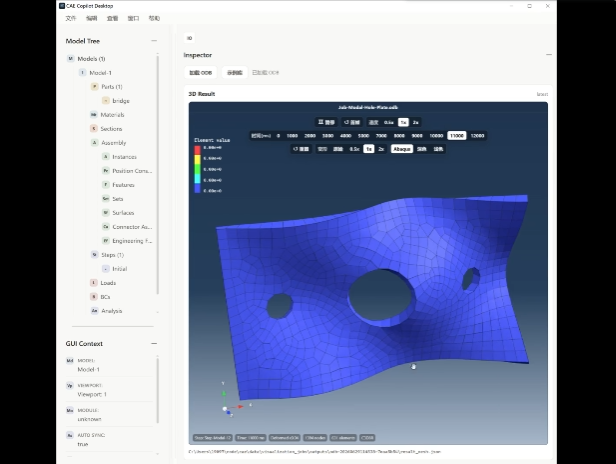
From One Sentence to Abaqus Operations
The user inputs a complete modeling requirement in one sentence, the system generates an execution plan, and then sequentially completes operations such as part creation, material assignment, section definition, and meshing in Abaqus.
One-sentence conclusion: One sentence generates a real Abaqus model.
Example Instruction
Create a rectangular part Rect-Test with length, width, and height all equal to 10; then create a solid section for Rect-Test and assign material Steel-Q235. If the material does not exist, create an elastic material Steel-Q235 with elastic modulus E=206000 MPa, Poisson's ratio ν=0.3, and density ρ=7.85e-9 tonne/mm³; mesh with a global seed size of 1 and element type C3D8R.
In the past, such standard modeling workflows often required manual scripting or repeatedly clicking menus, filling parameters, and checking object names in Abaqus. The goal of CAE Copilot is not to replace engineers' judgment, but to let the system automatically complete these repetitive, standardized, and checkable operations.
It first understands the objects, materials, parameters, and target actions in natural language, then decomposes the task into stable steps, and preferentially calls encapsulated Abaqus tool functions for execution. This retains the large model's ability to understand complex intentions while reducing the instability of freely generated scripts.
Core Function 2
Visualization: Models, Meshes, and Results Directly Visible
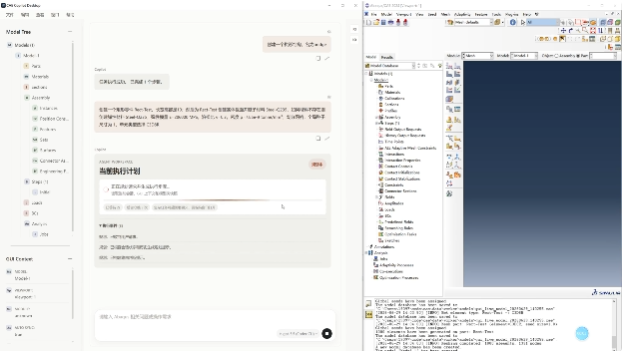
Not Just Generating Text, but Delivering Checkable Results
Geometric models, mesh effects, result contours, or animation frames can be directly displayed, allowing readers to see that the system outputs checkable CAE assets.
One-sentence conclusion: Models, meshes, and results can be viewed directly.
For CAE software, "being able to see results" is crucial. CAE Copilot does not just translate natural language into code text; it implements tasks into real Abaqus models, meshes, jobs, and result files.
Core Function 3
Automatic Context Synchronization: Letting the LLM Obtain Abaqus Status
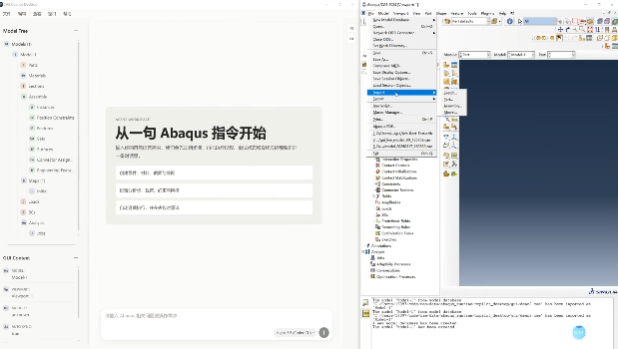
Letting the LLM Continue Operations Based on the Current Simulation Scene
The current Abaqus model tree, active objects, execution logs, or result status are synchronized into the system, allowing users to issue modification instructions based on the current model.
One-sentence conclusion: The LLM can obtain the current Abaqus session status.
Many CAE automation failures occur not because the large model cannot reason, but because it does not know what is happening in the current simulation scene. What parts are in the current model? What are the instance names? Has the material been created? Has the job been submitted? Where are the result files? Without this information, the large model can only generate scripts based on guesswork.
CAE Copilot makes "context synchronization" a core capability: the system synchronizes the model tree, interface state, execution logs, error information, job status, and result file paths, so that subsequent planning and repair are based on the real Abaqus session, not on imagining a model detached from the scene.
2. Why CAE Automation Needs Such an Agent
CAE workflows have a contradiction: on one hand, many operations are highly repetitive and have automation value; on the other hand, simulation tasks heavily depend on context, object names, coordinate directions, boundary conditions, and execution feedback. A single script can hardly cover the variations in real engineering scenarios.
Traditional Abaqus scripts can accomplish a lot of automation, but they have a learning curve: engineers need to be familiar with the API, maintain scripts, handle errors, and constantly check the current model state. With the advent of large models, they can understand natural language and generate scripts, but without execution constraints and context feedback, the output is prone to mismatched object names, step drift, missing parameters, etc.
Core judgment: CAE Copilot chooses not to "let the large model write all code at once," but to connect the large model, tool function library, Abaqus execution environment, and result feedback. The large model is responsible for understanding and planning, tool functions for stable execution, Abaqus for real computation, and logs and results for review.
3. What is CAE Copilot
CAE Copilot is a simulation agent for the Abaqus workflow. It supports users in describing tasks through natural language and automatically completes multiple stages from task decomposition to simulation execution, including modeling, materials, sections, assembly, loads, boundary conditions, contacts, meshing, jobs, and result viewing.
Its positioning is not to replace simulation engineers, but to become an automation assistant beside engineers: making repetitive processes faster, standard operations more stable, and execution processes clearly recorded, so that engineers can focus more on solution judgment, parameter design, and result analysis.
A Typical Workflow

4. How It Works: From Script Writing to Controllable Execution
1. Multi-Agent Collaboration
Complex simulation tasks are not suitable for a single large model to handle from start to finish. CAE Copilot adopts a multi-agent collaboration approach: the routing agent determines whether the user request is clear and whether clarification is needed; the planning agent decomposes the goal into steps such as modeling, material assignment, loading, meshing, and solving; the execution agent calls tools, writes code, observes feedback, and retries after failure in each subtask.

The advantage of this decomposition is that each step is shorter, more explicit, and easier to check. Compared to generating a long script all at once, step-by-step execution significantly reduces the cost of locating problems.
2. Tool Function Library
In engineering implementation, stability is more important than "looking smart." CAE Copilot encapsulates common Abaqus operations into tool functions, and the execution agent preferentially calls these tool functions rather than freely generating scripts. This leverages the flexibility of the large model in understanding natural language while ensuring that key operations fall on more stable execution interfaces.
3. Context Engineering
Context engineering is key to the reliable operation of this system. CAE tasks are not isolated instructions but occur in a continuously changing simulation scene. The user may have modified the model in the GUI, the previous execution may have created new instances, a job may be running, and result files may have been generated.

The system needs to continuously synchronize this information to the LLM, including the current model tree, active objects, created parts/instances/sets/surfaces, execution logs, error stacks, job status, and result paths. The more complete the context, the closer the planning is to the real model, and the more basis there is for automatic repair.
4. Reviewable, Executable, Traceable
CAE Copilot's goal is not to create an inexplicable black box, but to form a process that engineers can inspect: plans before execution, logs during execution, results after execution, and error information and repair traces upon failure.
This is very important for engineering scenarios. Simulation is not just about "running"; it is also necessary to know what the system did, why it did it, where the result files are, and how to reproduce errors.
5. Test Cases: Covering Multiple Tasks from Modeling to Results
Below are selected cases, using text and images to show CAE Copilot's actual performance in scenarios such as modeling, code generation, meshing, analysis steps, and multi-object assembly.
Case 1: Standard Static Analysis Workflow
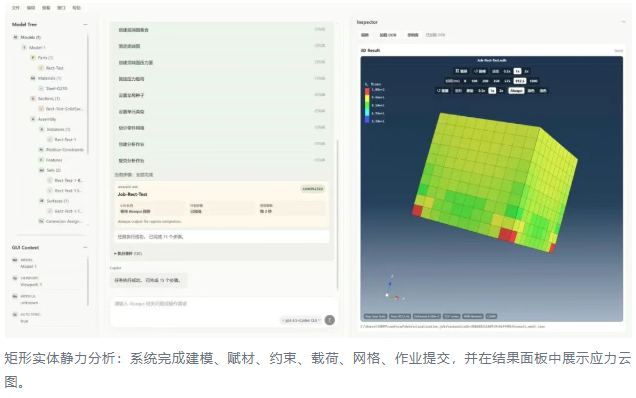
This case covers the most typical Abaqus standard workflow: create a rectangular solid, create material and section, create assembly instance, set up a static analysis step, fix the bottom face, apply pressure on the top face, mesh with C3D8R elements, and submit the job.
Demonstrated value: From a single natural language requirement to a complete standard simulation loop.
Execution result: Successfully completed modeling, solving, and result viewing.
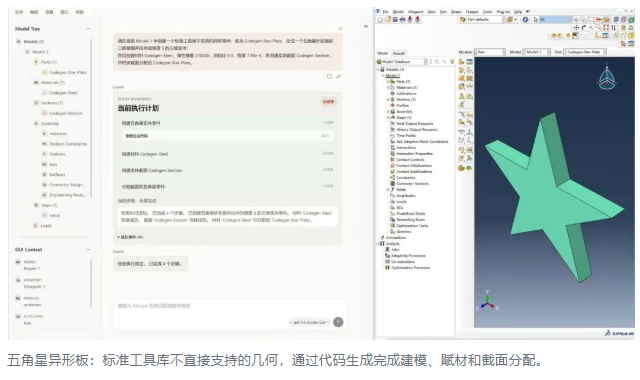
Case 2: Code Generation for Irregular Parts
Standard parametric function libraries can cover common geometries, but engineering often encounters non-standard contours. This case requires the system to create a 3D solid with a five-pointed star outer contour, and complete material Codegen-Steel, section Codegen-Section, and section assignment.
Demonstrated value: Combination of tool function library and code generation to cover non-standard geometries.
Execution result: Successfully created an irregular part and completed material and section settings.
Case 3: Remeshing and Element Type Comparison
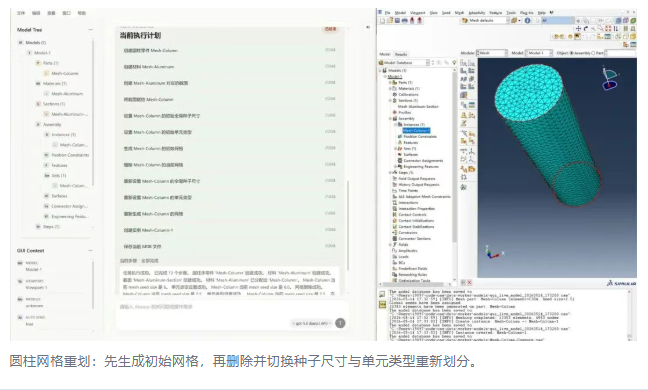
This case requires the system to create a cylindrical part Mesh-Column, first generate a mesh with a coarser global seed size and C3D8R elements, then delete the current mesh, and regenerate with a finer seed size and C3D4 elements. It demonstrates the ability to "continue operating on existing objects": the system needs to know the current part, current mesh state, and subsequent remeshing goals, rather than starting from scratch each time.
Demonstrated value: Supports continuous modification, mesh deletion, parameter updates, and regeneration.
Execution result: Successfully completed remeshing and model saving.
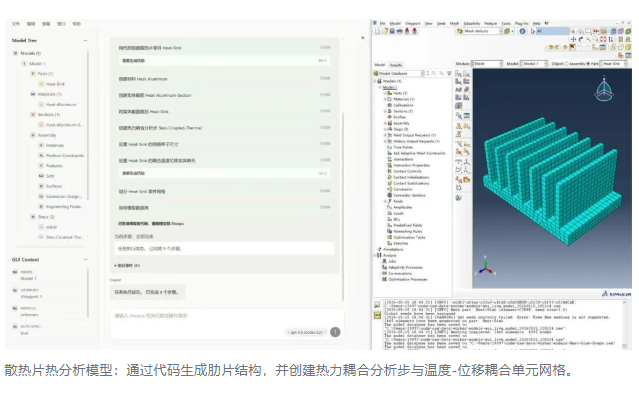
Case 4: Thermal Analysis Heat Sink
The system needs to generate a base plate and multiple uniform fins, create Heat-Aluminum material, set up a coupled temperature-displacement analysis step, and mesh with C3D8RT elements suitable for temperature-displacement coupling.
Demonstrated value: Covers code-generated geometry, coupled temperature-displacement analysis step, and specialized element settings.
Execution result: Successfully completed heat sink modeling, meshing, and model saving.
6. Capability Boundaries and Recommended Usage
More Stable Scenarios
Creating objects with clear numerical values and performing explicit operations on named entities. For example, creating parts with specified dimensions, assigning materials to specified parts, applying loads on specified surfaces, and meshing with specified element types.
Scenarios Requiring Clearer Descriptions
Complex spatial assemblies, vaguely described positional relationships, overly long composite tasks at once, and highly non-standard geometries or contact settings.
Recommended Writing Style
Try to specify coordinate axes, directions, angles, and numerical values clearly.
Break complex tasks into multiple rounds, each completing a set of clear actions.
Manually confirm key steps, such as contact surfaces, load directions, and constraint positions.
7. What Value Does It Bring
For simulation engineers: Reduce time spent on repetitive modeling, script writing, and procedural operations, allowing engineers to complete standard workflows, batch trials, and solution iterations faster.
For teams: Accumulate common simulation workflows, extract experience from personal scripts and verbal instructions into reusable and traceable execution chains.
For enterprises: Become part of the CAE intelligent platform, connecting natural language and knowledge bases on one end, and simulation software, function libraries, result files, and workflow templates on the other.
AI empowering CAE: the real value is not just "making large models write Abaqus scripts." More importantly, it connects natural language understanding, task planning, tool execution, context synchronization, and result feedback into a controllable loop. The direction of CAE Copilot is to let engineers drive simulation software in a more natural way, make repetitive processes more automated, execution processes more transparent, and result review easier. AI does not replace simulation experts, but can become a more knowledgeable assistant beside experts in the engineering field.
